Table of Contents
- Why Screen Time Ends in Tears (and What Actually Helps)
- Screen Time Transition Strategies for Toddlers That Prevent Meltdowns
- What to Say When a Toddler Refuses to Turn Off the TV
- Build a Screen Time Schedule for Toddlers That Sticks
- Parental Controls for YouTube: Set Limits Before the Fight Starts
- What to Do During and After a Tantrum (When Prevention Fails)
- Keep Rules Consistent Across Caregivers, Devices, and Settings
- Frequently Asked Questions
Last Updated: October 17, 2026
Why Screen Time Ends in Tears (and What Actually Helps)
The hardest part of how to manage screen time for toddlers without tantrums isn't the limit itself. According to Ann & Robert H. Lurie Children's Hospital of Chicago's 2025 screen time statistics, 28% of parents give in to screen time to avoid a meltdown multiple times a week. At Watchly Player, we hear the same story from parents every day: the show ends, the crying starts, and the tablet comes back on.
That cycle has a cause. Screen time is not the enemy here. The abrupt ending is.
The tantrum trigger hiding in every episode
A toddler's brain is still learning to switch gears. When a favorite show stops mid-story, the child loses something they were enjoying, with no warning and no control. A 2024 study led by Fitzpatrick reported an association between more toddler screen time and more tantrums, and the sudden loss of a screen is one reason transitions go badly.
So the fix isn't stricter rules. It's a better ending.
Screen Time Transition Strategies for Toddlers That Prevent Meltdowns
The best screen time transition strategies for toddlers are simple: warn before the end, count down, and let the child take part in turning it off. These three steps remove the surprise that sparks most meltdowns.
The two-minute warning and countdown timer method
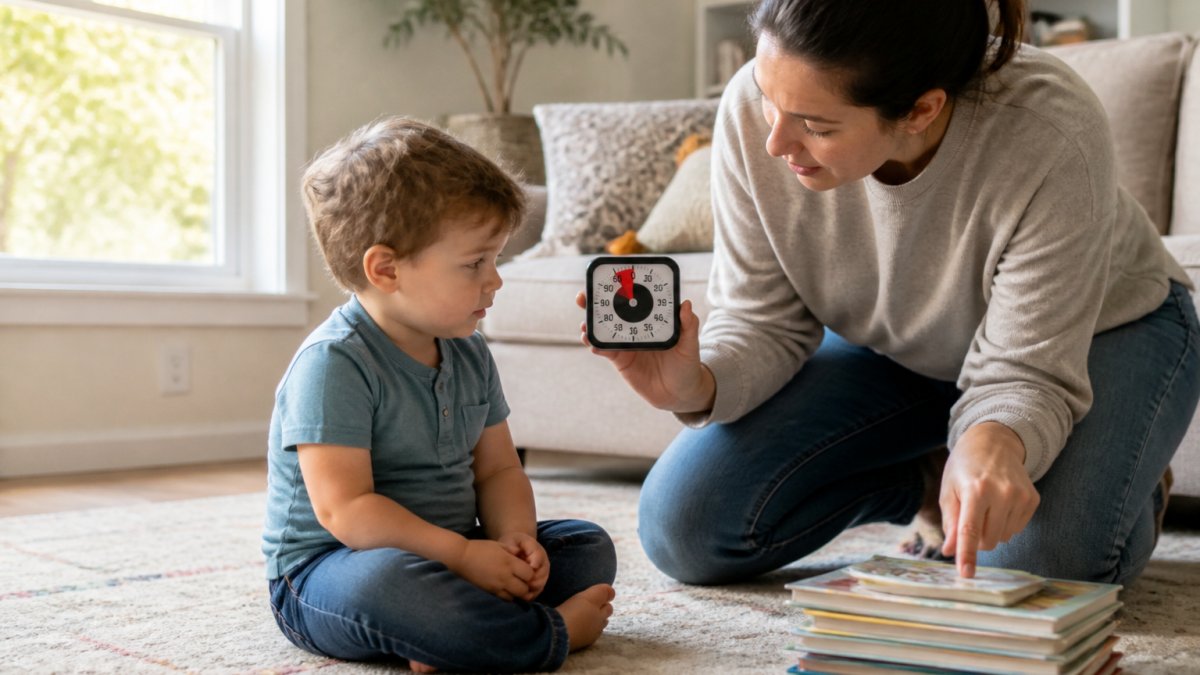
Give a verbal reminder two minutes before the end, then one minute, then thirty seconds. Pair it with a countdown timer your child can see. A visual timer works better than a clock for toddlers because they can watch the time run out.
Let your toddler press the off button
Handing a toddler the power to end the show themselves changes the whole mood. They're not losing the screen. They're the one closing it. This small shift in control prevents a lot of fights.
What to Say When a Toddler Refuses to Turn Off the TV
What to say when a toddler refuses to turn off the TV is short and calm: name the feeling, restate the rule, and offer the next thing. The American Academy of Pediatrics' HealthyChildren.org tips recommend staying calm, avoiding lectures, using device settings, and redirecting physical aggression.
Most advice stops there. In practice, the refusal usually has a cause, and the words only work when they match it. Before you say anything, read the moment.
A step-by-step transition script caregivers can repeat word for word
A repeatable sequence beats improvising. This is the same five-beat script every time, so your toddler learns the pattern:
- Signal. "Two more minutes, then the show is done." Say it while making eye contact, not from the kitchen.
- Acknowledge. "You love this one. It's hard to stop." Name the feeling before the rule.
- Restate the rule. "The rule is one show. The show is done."
- Hand over control. "Do you want to press the button or should I?" Give a real choice inside the limit.
- Offer the next thing. "Blocks or the park?" Two options, both acceptable to you.
Say each line once. Repeating the script turns it into a negotiation, and negotiation is what you are trying to avoid.
Match the script to the trigger
A refusal is not one behavior. A simple way to personalize your response is to identify which of these is driving it:
- Stopping trigger. The show is ending and the child has no control. Use the full five-beat script and the off-button handover.
- Content trigger. The show is overstimulating or scary, and the child is wound up rather than sad. Switch to calmer content next session and shorten the block.
- Fatigue or hunger trigger. The refusal is really a tired or hungry toddler. Offer a snack or quiet time before the screen goes off, not after.
When you know the trigger, you stop treating every refusal the same way, and the script lands instead of bouncing off.
When the script does not work
Some days it will not. The move then is not a longer explanation. Restate the rule once, hold the limit, and let the tantrum run its course, the next section covers how. What matters is that the words and the outcome stay the same every time, because consistency is what teaches a toddler that the ending is predictable.
Build a Screen Time Schedule for Toddlers That Sticks
A screen time schedule for toddlers works when it's predictable and tied to the day's rhythm. Same time, same length, same ending ritual. A written plan beats a rule you make up on the fly.
Most schedules fail for one reason: they are copied from another family. A plan sticks when it matches your child's age, your day, and the trigger behind your worst transitions.
| Time of Day | Screen Activity | Length | Transition Cue |
|---|---|---|---|
| Morning | One short show | 20 min | Timer plus two-minute warning |
| After lunch | Calm video | 15 min | Child presses off button |
| Afternoon | Screen-free play | None | Outdoor or craft time |
| Evening | Wind-down video | 15 min | Bedtime window locks device |
Tune the plan to your toddler's age
The results most parents read blur toddlers together with preschoolers, but a two-year-old and a four-year-old need different plans. The Children and Screens guide for ages 0-5 recommends no screen time for children under 2 beyond video chatting, and predictable limits after that.
- Under 2. Video chatting with relatives is the main exception. If a screen is used at all, keep sessions short, co-viewed, and part of a routine rather than a reward.
- Ages 2 to 3. One short block a day is a common starting point. Shorter sessions with a clear ending ritual work better than one long block, because attention spans and transition skills are still forming.
- Ages 3 to 4. Two short blocks, one after breakfast, one to wind down, are manageable for many families, provided the ending ritual is identical each time.
Treat these as starting points, not rules. The right length is the one your child can end without a meltdown most days.
Build the plan around your child's trigger
A schedule is only as good as its weakest transition. Look at the last three meltdowns and ask what set them off:
- If stopping is the trigger, shorten each block and add the off-button handover to every session.
- If content is the trigger, move overstimulating shows earlier in the day and keep the evening block calm.
- If fatigue or hunger is the trigger, schedule screen time after a snack or rest, never right before one.
Write the trigger next to each block on your plan. It tells every caregiver what to watch for, not just when to hand over the tablet.
A sample daily rhythm for ages 2 to 4
Mornings after breakfast, one short show. After lunch, a calm video. The afternoon stays screen-free with outdoor play, a tricycle, or a water activity book. Evening brings one wind-down video, then the device goes away for the night. Transitions remain the most difficult part of this routine, so mastering a few calm down techniques can help your toddler navigate the shift from digital engagement to the quiet of bedtime.
Make the plan survive real life
A schedule that only works on quiet days is not a schedule. Build in two rules: the plan does not move because a child asks, and a missed block is skipped, not doubled. Both keep the rhythm predictable, which is the whole point.
Parental Controls for YouTube: Set Limits Before the Fight Starts
Parental controls for YouTube work best when they enforce the limit for you. The Children and Screens guide for ages 0-5 recommends no screen time for children under 2 beyond video chatting, and predictable limits after that.
This is where Watchly Player helps. It's built by parents, and it enforces daily watch time and bedtime windows automatically, so the limit isn't a negotiation. It also removes ads, comments, and the recommendation feed, and only plays videos you approve.
Why autoplay and the recommendation feed keep toddlers hooked
Autoplay and the recommendation feed keep serving the next show, and the next one after that. There's no natural stopping point, so every ending becomes a fight. Turning both off gives your toddler a clear finish line.
What to Do During and After a Tantrum (When Prevention Fails)
During a tantrum, stay calm and keep the limit in place. Get low, use few words, and give your child space to ride it out. Don't turn the screen back on to stop the crying.
Afterward, once everyone is calm, name what happened without shame. "You were upset. That's okay. The show still ends when the timer says." Then move on to something physical, like outdoor play or a soothing activity.
Keep Rules Consistent Across Caregivers, Devices, and Settings
The rules only hold if every caregiver follows them. A grandparent who gives in at naptime undoes a week of progress. Write the plan down and share it with everyone who watches your child.
Cover the basics:
- Same screen-time limits at home and away
- Same two-minute warning and timer
- Same bedtime window on every device
Individual profiles help here. Each child gets their own library and limits, so a younger sibling isn't getting the older child's settings. And because Watchly Player never sells or rents your data, you're not trading privacy for peace of mind.
Frequently Asked Questions
Can screen time cause tantrums in toddlers?
Research has linked more screen time to more tantrums. A 2024 study led by Fitzpatrick reported that adding about an hour of extra screen time was associated with more tantrums in toddlers. The meltdown itself often comes from the abrupt end of screen time rather than the screen alone, so predictable limits and advance warnings matter. The American Academy of Pediatrics also notes that transitions away from devices are a common flashpoint, which is why a countdown and a consistent routine reduce friction.
What should I say when my toddler refuses to stop watching?
Keep it short, calm, and final. Name the limit and the next step: "The show is done. It's time to turn off the TV. You can press the button or I can help you." Avoid lectures or negotiating, which the American Academy of Pediatrics advises against during these moments. Offer a choice that stays inside the limit, such as which book to read next. Then follow through without repeating yourself, and redirect attention to a screen-free activity.
How much screen time is appropriate for a toddler?
The Children and Screens guide recommends no screen time for children under 2 beyond video chatting. For toddlers and preschoolers, the emphasis is on predictable limits, parental controls, and modeling good screen behavior rather than a single number. A 2023 review by Muppalla and colleagues describes setting boundaries and using device settings as practical tools. A consistent daily schedule with clear start and end points matters more than squeezing in extra minutes.
Do warnings help toddlers transition away from screens?
Yes. Advance notice gives a toddler time to prepare for the change. A two-minute warning, then a one-minute warning, followed by a countdown timer, makes the ending predictable instead of sudden. The American Academy of Pediatrics lists keeping calm, using device settings, and redirecting physical aggression among its tips for handling screen-time transitions. Pair warnings with a consistent routine so your toddler learns that the warning always leads to the same calm ending.
The tears at the end of screen time aren't a sign you're failing. They're a sign the ending needs a plan. Watchly Player makes that plan automatic with parent-approved libraries, daily watch times, bedtime windows, and zero autoplay or ads. Start your free trial and let the rules hold, even when you're not in the room.